FFTable Flagship
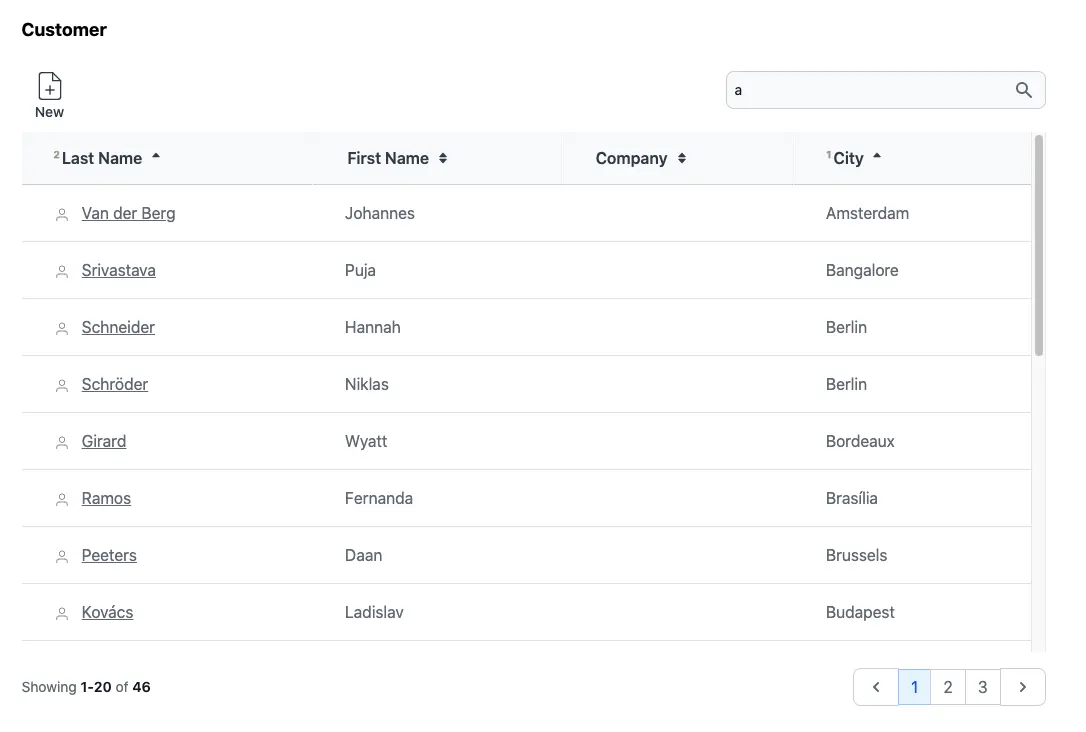
FFTable is the best feature of Fuwafuwa Framework. This feature allows you to quickly build nice, responsive table view of selected fields in a table. It provides multiple fields sorting, searching, formatting, pagination, add/modify record. Let's review Customer view in Chinook sample aplication.
<?php
// MODEL: app/controllers/user/model/chinook/customer.php
namespace Model\Chinook;

class Customer extends \Fuwafuwa\BaseModel {

    function __construct(\Data\Chinook $db) {
        parent::__construct($db, 'Customer', ['ai_field' => 'CustomerId',]);
        $this->validation = [
            'rules' => [
                'FirstName' => 'required',
                'LastName' => 'required',
                'Address' => 'required',
                'Email' => 'required|email',
            ]
        ];
    }
}
<?php
// CONTROLLER: app/controllers/user/ajax/chinook/employee.php

namespace Ajax\Chinook;

class Employee extends \Fuwafuwa\Controller\FFTable {

    function list($f3) {
        $this->recordList('\Model\Chinook\Employee');
    }

    function edit($f3) {
        $this->ajaxEdit('\Model\Chinook\Employee');
    }

    function elist($f3) {
        $sql = "SELECT e.*, h.FirstName as HeadFirstName, h.LastName as HeadLastName
        FROM Employee e
        LEFT JOIN Employee h ON e.ReportsTo = h.EmployeeId ";
        $csql = "SELECT COUNT(1) FROM Employee e";
        $this->recordElist($sql, $csql);
    }
}
For simple table without lookup from other table, the controller code become very simple, only
edit and list method is required. The complexity of pagination, searching,
sorting are
handled by FFTable.
<f3:inject id="content">
    <h2 class="text-lg font-bold">Customer</h2>
    <div x-data="data">
    <include href="blocks/table.html" />
    <include href="blocks/modal-form.html" />
    </div>
</f3:inject>
<f3:inject id="script">
    <script src="{{@BASE}}/js-src/fftable.js"></script>
    <script type="text/javascript">
    let settings = {
        fields: [
        {
            title: 'Customer Id', name: 'CustomerId', visible: false, readonly: true
        },
        {
            title: 'Support Rep', name: 'SupportRepId', visible: false, type: 'select', triggerChange(d) {
            fetchData('{{@BASE}}/ajax/chinook/employee/select-option',).then(data => {
                this.options = data;
            });
            },
        },
        {
            title: 'Last Name', name: 'LastName', formatter(v, c, d) {
            return `<svg viewBox="0 0 24 24" class="inline mr-2 stroke-1 size-4 stroke-gray-500 dark:stroke-gray-400 fill-transparent">
        <use href="#people" />
    </svg> <a class="underline" href="{{@BASE}}/chinook/customer/${d.CustomerId}">${v}</a>`;
            }, raw: true, class: 'whitespace-nowrap', searchable: true
        },
        { title: 'First Name', name: 'FirstName', searchable: true },
        { title: 'Company', name: 'Company', class: 'whitespace-nowrap' },
        { title: 'Address', name: 'Address', visible: false, type: 'textarea', fclass: 'md:col-span-2' },
        { title: 'City', name: 'City', class: 'whitespace-nowrap' },
        { title: 'State', name: 'State', visible: false, },
        { title: 'Country', name: 'Country', visible: false, },
        { title: 'PostalCode', name: 'PostalCode', visible: false, },
        { title: 'Phone', name: 'Phone', visible: false, type: 'tel' },
        { title: 'Fax', name: 'Fax', visible: false, type: 'tel' },
        { title: 'Email', name: 'Email', visible: false, type: 'email' },
        ],

        // table options
        table: {
            url: '{{@BASE}}/ajax/chinook/customer/list',
            editable: true,
            selection: 'single',
            pageSize: 20,
            sorting: 'multiple'
            size: 'large',
            // display: 'compact',
        },

        // form options
        form: {
            url: '{{@BASE}}/ajax/chinook/customer/edit',
            object: 'Customer',
            size: 'normal', // small, normal, large, huge
            columns: 2,
            size: 'large',
            pk: ['CustomerId'], // primary key
        }
    }
    let data = FFTable(settings);
    </script>
</f3:inject>
<include href="blocks/popup.html" />
in the content section, we simply include table and modal-form blocks. The detail is in the script
section, where
the
table configuration is defined. Table configuration consists of fields, table
and
form property. Available properties for each are below:
Fields
Fields define columns that we want to show in table and form.
titlenamevisiblevirtualreadonlyhiddensortableinlinetypedefaultattr{ 'x-on:keyup.debounce': 'check_input()', 'maxlength': 100 }
validatorformatterfunction(value, column, data) to format current value. Example:
function(v) { return '$' + v }encoderfunction(value, column, data) to format data before saving into database:
function(v) { return JSON.stringify(v) }decoderfunction(value, column, data) to parse data from database
function(v) { return JSON.parse(v) }rawinitOptionsfunction(data) to be executed in form show event. Usually for initialization of select
options.
triggerChangefunction(data) to be executed when there is a change on watched properties.
Example:
{ title: 'Support Rep', name: 'SupportRepId', visible: false, type: 'select', triggerChange(d) {
        fetchData('{{@BASE}}/ajax/chinook/employee/select-option',).then(data => {
                this.options = data;
            });
        },
    },
d contains current data. In code above, after executing fetchData, it will set
options
property of this (current field).
watchsearchableclassfclassqueryPrefix
            SELECT a.timestamp, u.name FROM activity a JOIN user u on
            a.userid = u.userid
, then you specify a or u for the queryPrefix, depends on which table you intend to query.
lookupUrllookupLabelIdUser and Username pair
to represent user in join query, then lookupLabel is assigned with Username.staticLookupfilter{ op: 'LIKE', } Add filter above table. Op is query operator. If op is
BETWEEN, second input filter will be shown.Valid op: LIKE, CONTAINS, START(S), END(S), IS (NOT) NULL, IN, < <= > >= = <> !=
For IN filter, value will be split on pipe character. Example:
{ op: 'IN', value: 'Black|Green|Red' } will result query
                        field IN ('Black', 'Green',
                        'Red')
.For < <= > >= filter, if value2 is specified, opposite sign complement will be added. Example:
{ op: '>', value: 10, value2: 20 } will result query
                        (field > 10 AND field <
                        20)
Table
table section define table display parameter.
urladdableeditabledeletableprintableexportablesearchableselectionsortingpageSizedisplaydisplayClassrowClassrowClass(idx, row)cellClasscellClass(ridx, cidx, row, col)sizedeferLoadingcustomHeader
[
    [
        { title: 'City', attr: { rowspan: 2 }, class: 'border-r border-t' },
        { title: 'Clothes', attr: { colspan: 3 }, class: 'border-r border-t' },
        { title: 'Accessories', attr: { colspan: 2 }, class: 'border-t' }
    ],
    [
        { title: 'Trousers', class: 'border-r' },
        { title: 'Skirts', class: 'border-r' },
        { title: 'Dresses', class: 'border-r' },
        { title: 'Bracelets', class: 'border-r' },
        { title: 'Rings' },
    ]
],
footerData
[
    [
        { value: 'Total' },
        { name: 'sum-trousers', value: 10, class: 'text-right' },
        { name: 'sum-skirts', value: 10, class(v) { return { 'text-right': true, 'italic': v < 1000 } }, formatter(v) { return v + 5 } },
        { name: 'sum-dresses', value: 10, class: 'text-right' },
        { name: 'sum-bracelets', value: 10, class: 'text-right' },
        { name: 'sum-rings', value: 10, class: 'text-right' },
    ],
    [
        { value: '%' },
        { name: 'total-trousers', value: 10, class: 'text-right' },
        { name: 'total-skirts', value: 10, class: 'text-right', formatter(v) { return v + 5 } },
        { name: 'total-dresses', value: 10, class: 'text-right' },
        { name: 'total-bracelets', value: 10, class: 'text-right' },
        { name: 'total-rings', value: 10, class: 'text-right' },
    ],
],
functionsfunctions: {
add() { location.href = '{{@BASE}}/page/edit'; return true },
edit(data) { location.href = '{{@BASE}}/page/edit?id=' + data.id; return true; },
}
Each function needs to return true.
eventHandlerfunction(event, data)filterfilter: {
cols: 1,
width: 'xl:w-2/3',
}
Toolbartoolbar: [
{
title: 'Filter',
show(selected, data) { return selected },
action(data) { submit(data) },
icon: '<svg></svg>'
}
]
tableInit()Form
form section define form display parameter.
urlobjectsizecolumnspkfullHeightformInit()preSubmitfunction(data, oper) before submit, modify and return the data backonSubmittedfunction(data, oper) after submission, modify data before displayonShowfunction(data) modify data before showing form and return the data backonSubmittedfunction(data) modify data after received response from server after submission, and
return itProgressive Loading
FFTable supports progressive loading for handling large datasets efficiently:
let settings = {
    table: {
        progressiveLoad: true,  // Enable progressive loading
        size: 50,              // Records per page
        loadMoreText: 'Load More',  // Custom button text
        loadMoreClass: 'btn-primary' // Custom button class
    }
}
Progressive Loading Options
progressiveLoadsizeloadMoreTextloadMoreClassLoading States
FFTable provides several loading states that you can use to enhance the user experience:
loadingloadingMoremeta.progressiveLoadingmeta.showScrollTopScroll Detection
When progressive loading is enabled, FFTable automatically detects when the user scrolls to the bottom of the table and loads more records. You can customize this behavior:
let settings = {
    table: {
        progressiveLoad: true,
        containerId: 'my-table-container',  // Container for scroll detection
        scrollOffset: 100  // Distance from bottom to trigger load
    }
}
Field Validation
FFTable provides comprehensive client-side validation for form fields. You can specify validation rules in the field configuration:
let settings = {
    fields: [{
        name: 'email',
        type: 'text',
        validation: {
            required: true,
            email: true,
            minLength: 5,
            maxLength: 100,
            pattern: /^[^\s@]+@[^\s@]+\.[^\s@]+$/,
            custom: (value) => value.endsWith('@company.com') || 'Must use company email'
        }
    }]
}
Available Validation Rules
requiredemailminLengthmaxLengthminmaxpatternmatchescustomValidation Methods
FFTable provides several methods to handle validation:
validation.getFieldError(fieldName)validation.hasErrors()validation.validateField(field, value)validation.validateForm()Row Selection
FFTable supports both single and multiple row selection with keyboard navigation:
table.selectiontable.selectionCheckboxisSelected(index)toggleSelect()Keyboard Navigation
The following keyboard shortcuts are supported:
Arrow keysSpaceShift + ClickCtrl/Cmd + ClickCtrl/Cmd + ABackend
Ajax backend for table is very simple. You only need to implement list and
edit. Example:
<?php

namespace Ajax;

class User extends \Fuwafuwa\Controller\FFTable {

    function list(\Base $f3): void {
        $this->recordList('\Model\User');
    }

    function edit(\Base $f3): void {
        $this->ajaxEdit('\Model\User');
    }

    function elist($f3) {
        $sql = "SELECT al.*, ar.Name as ArtistName FROM Album al
            JOIN Artist ar ON al.ArtistId = ar.ArtistId";
        $csql = "SELECT COUNT(1) FROM Album al";
        $this->recordElist($sql, $csql);
    }
}
For list that involves complex query join, we can use elist method. In this method, we pass two
query, one for listing, and the other for counting.
Generators
Generators also available for FFTable to get basic form of the MVC files and modify later. Run this command in CLI:
php index.php data/generator/model --table=Customer > app/controllers/user/model/customer.php
php index.php data/generator/fftable --table=Customer > app/views/user/customers.html
php index.php data/generator/ajax-fftable --table=Customer > app/controllers/user/ajax/table/customer.php
See demo here
Example Usage & Best Practices
Here's a complete example of FFTable configuration implementing recommended practices:
let settings = {
    // Field definitions with validation
    fields: [{
        name: 'id',
        type: 'hidden'
    }, {
        name: 'email',
        type: 'text',
        label: 'Email Address',
        validation: {
            required: true,
            email: true,
            custom: (value) => {
                // Custom validation with clear error message
                if (!value.includes('@company.com')) {
                    return 'Please use your company email address';
                }
                return true;
            }
        }
    }, {
        name: 'status',
        type: 'select',
        label: 'Status',
        options: ['Active', 'Inactive'],
        validation: { required: true }
    }, {
        name: 'role',
        type: 'tom-select',
        label: 'Role',
        lookupUrl: 'roles/lookup',  // Server-side lookup for better performance
        validation: { required: true }
    }],

    // Table configuration with performance optimizations
    table: {
        selection: 'multiple',
        selectionCheckbox: true,
        progressiveLoad: true,  // Better performance for large datasets
        size: 50,
        columns: [
            { field: 'email', sortable: true },
            { field: 'status', sortable: true },
            { field: 'role', sortable: true }
        ],
        // Clear loading states for better UX
        loadMoreText: 'Loading more records...',
        loadMoreClass: 'btn-primary animate-pulse'
    },

    // Form configuration with validation handling
    form: {
        title: 'User Details',
        submitText: 'Save Changes',
        cancelText: 'Cancel',
        // Validation before submission
        onBeforeSubmit: function(data) {
            if (!this.validation.validateForm()) {
                return false;
            }
            // Additional data processing if needed
            return data;
        },
        // Handle response after submission
        onSubmitted: function(response) {
            if (response.success) {
                // Show success message
                this.showMessage('Changes saved successfully');
                this.refreshData();
            } else {
                // Handle server-side validation errors
                this.handleErrors(response.errors);
            }
            return response;
        }
    }
}
Implementation
In your view file:
<!-- Include required components -->
<include href="blocks/table.html" />
<include href="blocks/form.html" />

<script>
    // Initialize with settings
    let settings = { /* Configuration from above */ };
    let table = new FFTable(settings);

    // Optional: Add custom keyboard shortcuts
    document.addEventListener('keydown', (e) => {
        if (e.ctrlKey && e.key === 'f') {
            e.preventDefault();
            table.focusSearch();
        }
    });
</script>
In your controller:
<?php
namespace Ajax;

class Users extends \Fuwafuwa\Controller\FFTable {
    // List records with server-side processing
    function list($f3) {
        // Apply filters and sorting server-side
        $filter = $this->getFilter();
        $sort = $this->getSort();

        $this->recordList('\Model\User', [
            'filter' => $filter,
            'sort' => $sort
        ]);
    }

    // Handle record editing with validation
    function edit($f3) {
        try {
            // Server-side validation
            if (!$this->validate()) {
                return $this->error('Validation failed');
            }

            $this->recordEdit('\Model\User');
        } catch (\Exception $e) {
            return $this->error($e->getMessage());
        }
    }
}
Best Practices Summary
- Enable progressive loading
- Use server-side processing
- Implement efficient validation
- Client + server validation
- Clear error messages
- Proper error handling
- Loading state indicators
- Keyboard navigation
- Clear feedback messages
- Structured configuration
- Separated concerns
- Consistent error handling